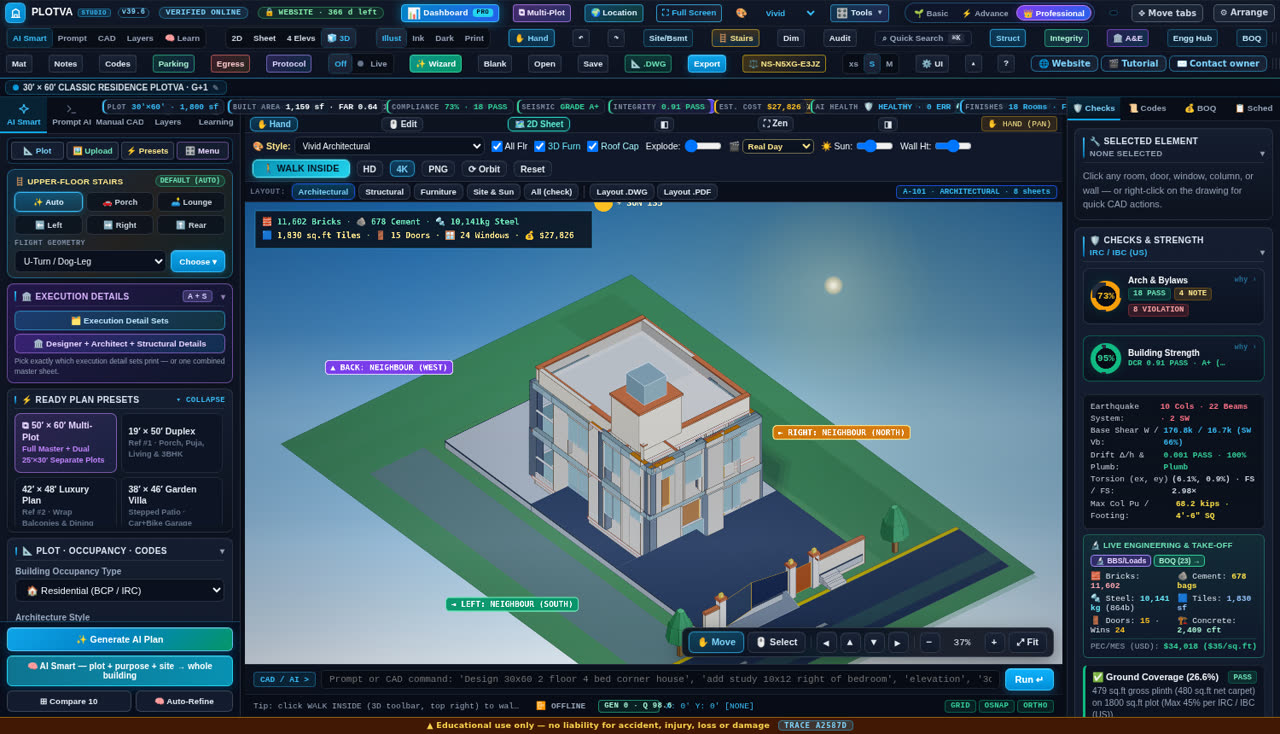
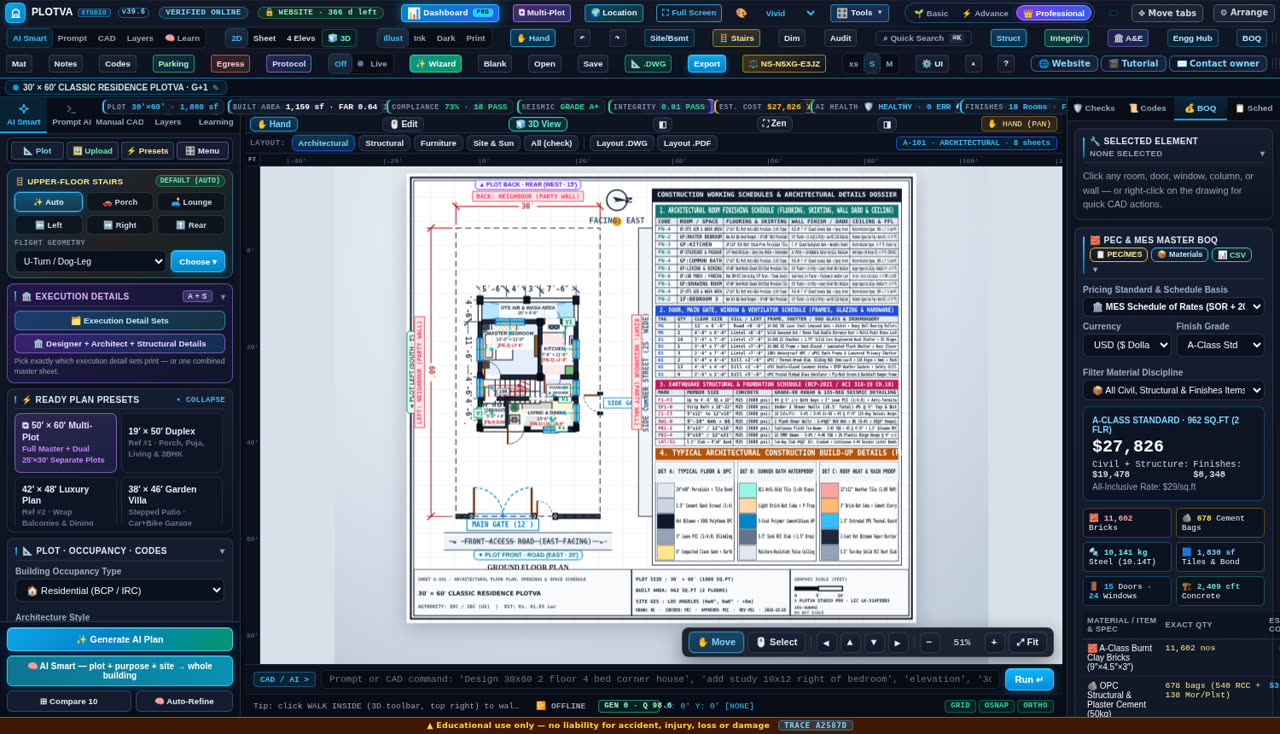
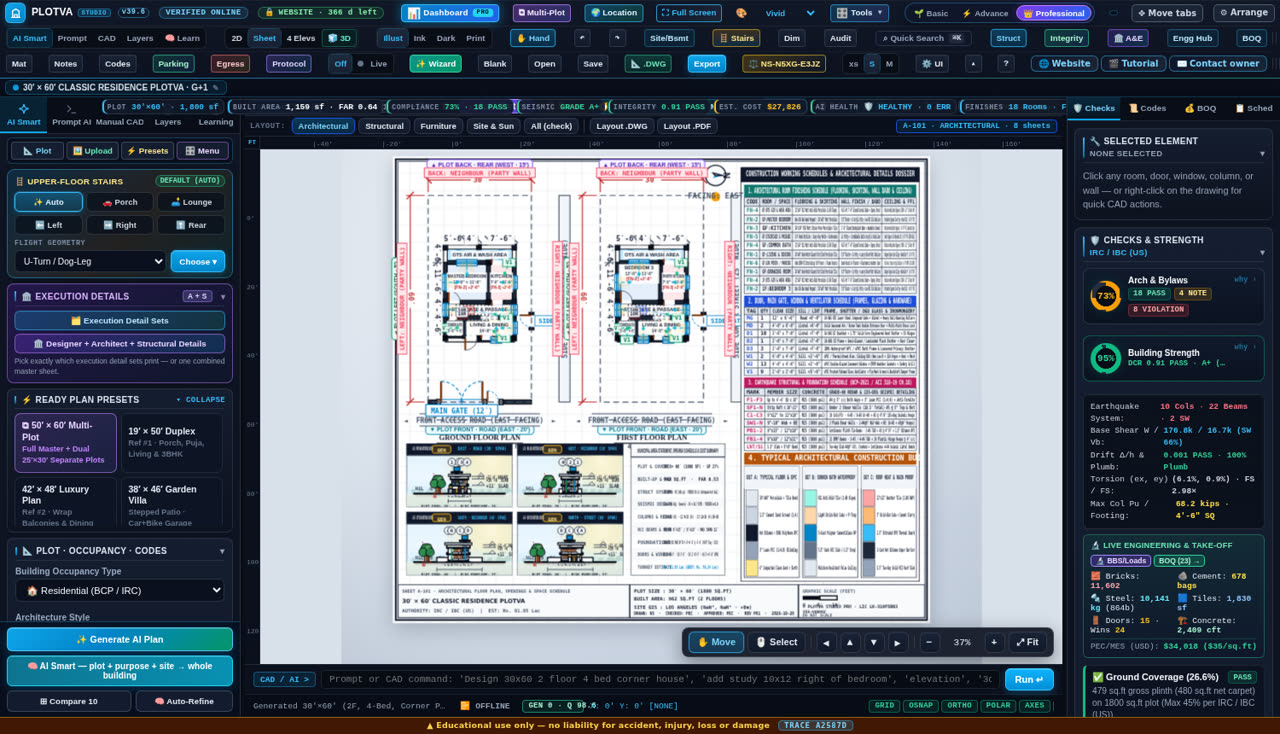
Type the plot size, the floors and the rooms. PLOTVA Studio Pro plans the house, sizes the structure and draws every sheet — floor plans, elevations, sections, foundation, beams, columns, BOQ and bar-bending schedule — then exports native AutoCAD DWG / DXF, a print-ready A4 PDF set and 3D views. One offline file. No internet needed.
The viewer is free and needs no key — open every tool, look at everything. Designing, saving and downloading need a plan.

The same set a practice charges days for. Every sheet is drawn from your plot size, room list and structure choices, and every number in the schedules is computed, not typed.
Furnished plans with room names, sizes and levels; four elevations; sections through the building.
Foundation layout, footing schedule, plinth and tie beams, columns with marks, slab and beam sizes, bar-bending schedule with cut lengths.
Bricks, cement, steel, sand, aggregate, tiles, paint and labour — quantities and cost from the drawing.
The same building in 3D with sun position, furniture, MEP and roof toggles — before anything is built.
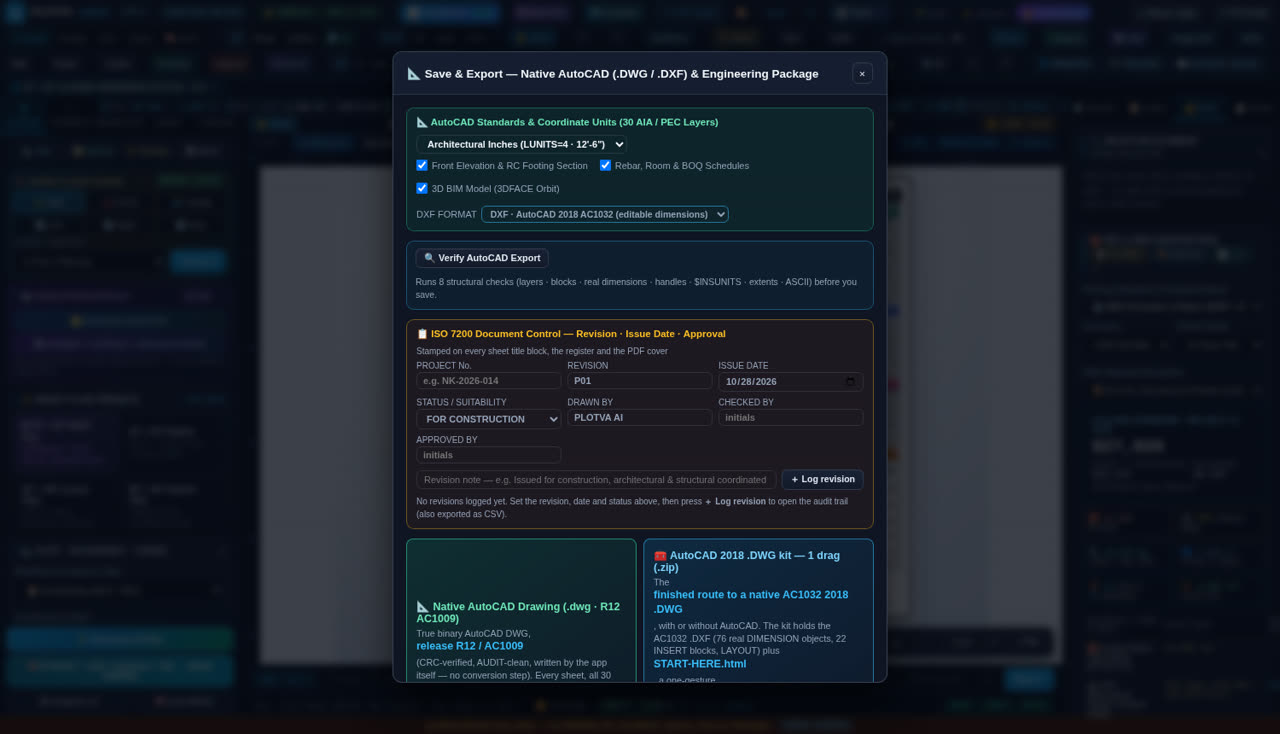
Native drawing on 30 AIA layers with real dimensions, blocks, handles and $INSUNITS — opens in AutoCAD, BricsCAD, ZWCAD, DraftSight.
Bylaw compliance, setback, coverage, FAR, corridor widths, structural integrity, drift, torsion and seismic demand, recalculated live.
The studio does not “look like” an engineering tool — it runs the checks and shows the numbers. Below is exactly what is calculated, so a professional can judge it before trusting it.
| Discipline | What is done | Basis |
|---|---|---|
| Architecture | Setbacks, ground coverage, FAR, room minimum sizes, corridor widths, stair rise/going, ventilation | Local bye-laws per selected city (e.g. RDA / CDA / LDA profiles), IRC 2021, IBC 2024 |
| Structure | Column grid and sizes, beam and slab depths, footing size from load and soil capacity, one-way vs two-way behaviour | ACI 318-19, ASCE 7-22, AISC 360, NDS, BCP-2021 / PEC profiles |
| Seismic | Base shear, seismic weight, zone factor, soil type, drift and torsion checks, member demand/capacity | ASCE 7-22, UBC-97 zone mapping for Pakistan, SBC/BCP annexes |
| Documents | Title block, revision register, drawing register, controlled standards register, document control fields | ISO 7200 fields, office issue conventions |
| Quantities | Brick, cement, sand, aggregate, steel by diameter, tiles, paint, labour, cost per sq.ft | Standard take-off rules from the drawing geometry |
Compliance %, structural integrity, drift and torsion are recomputed on every edit — not on a “check” button.
Every score has a why panel listing the rule, the value found and the value required, so you can argue with it and override it.
Project number, revision, issue date, drawn/checked/approved and a revision log travel with every sheet.
PLOTVA Studio Pro is a concept and drafting aid. It is not a substitute for a licensed structural engineer, a soil investigation, or the authority having jurisdiction. Every output must be verified by a qualified architect or engineer before construction. The checks are engineering calculations on the geometry you give it — if the input is wrong, the output is wrong. Defaults for a country or city are presets, not a legal opinion; the local authority always overrides.
Most house plan software assumes American lots and English units. A house map design in Pakistan starts with a plot measured in feet and quoted in marla, and a naksha that has to satisfy the local building authority. This one was built in Rawalpindi for the plots people actually build on here: type 25′ × 50′ and it tells you that is 5 marla, checks the RDA setbacks, draws the floor plan, the front elevation and the 3D view, prices the cement and steel in rupees, and hands you a drawing set a consultant can open in AutoCAD.
Enter the plot in feet and the sheet reports the area in marla, square feet and square yards at the same time — the units the society, the patwari and the contractor each ask for. 25×50 is 5 marla; 35×65 is about 10 marla; 50×90 is one kanal.
RDA Rawalpindi, CDA Islamabad, LDA Lahore and SBCA Karachi setback, coverage, floor-area-ratio and height rules are applied as you type, plus IRC and IBC for work outside Pakistan. The plan tells you which rule it applied and where it stands.
Bricks, steel, cement, sand and tile are taken off the drawing itself and priced in PKR per item and per square foot, with the bar-bending schedule — so the number you take to the market came from the geometry, not from memory.
“ghar ka naksha” · a full map of the house, room by room, drawn to scale. “house map design” · floor plan plus elevations, front and back. “plot ka naksha with 3D” · a walk-through view of the same model. “naksha banane wala software” · exactly this: one file, no subscription, no internet needed to draw.
Homeowners testing a layout before they commit a lakh to a mason; architects and draftsmen producing a first-pass set in an afternoon instead of a week; civil engineers who need the structural numbers and the BOQ beside the drawing; and contractors who want the quantities in writing before they quote.
One honest point: the drawing set this produces is a design and study set. Approval drawings in Pakistan must be signed by a PCATP-registered architect, and structural design sealed by a registered engineer — the software gives them something accurate to start from, it does not replace their signature.
A plot is a plot wherever it is. What changes is the unit on the tape, the code on the drawing and the currency on the bill of quantities. Pick the country once and PLOTVA switches all three: feet and inches or metres, 26 national code families, and a BOQ in PKR, USD, GBP, EUR, AED, SAR or INR. Then it draws the plans, elevations, sections, 3D views and the structural checks, and writes a native AutoCAD DWG set that a consultant anywhere can open.
Switch the whole sheet between imperial and metric; areas print in ft², m², sq yd, marla and kanal at the same time, so an American client, a British builder and a Pakistani patwari read the same drawing without conversion arguments.
IBC 2024 / IRC 2021 / ASCE 7-22 for the US, NBC 2020 + CSA A23.3 for Canada, Building Regulations 2010 + BS EN 1992/1998 for the UK, Eurocodes EN 1990–1998 for the EU, NCC 2022 + AS 3600 for Australia — plus the Gulf, Asia, Africa and Pakistan. The output states which family, which seismic parameters and which load combination it used.
Bricks, concrete, steel, formwork, finishes and labour taken off the drawing, priced per item and per sq ft or m² in PKR, USD, GBP, EUR, AED, SAR or INR, with live exchange rates online and a stored rate offline. A client in Dubai and a client in Karachi get the same quantities, each in their own money.
United States — IBC 2024 occupant load and egress width checks,
IRC 2021 residential framing, ASCE 7-22 wind and seismic, ACI 318-19 concrete design, dimensioned in
feet and inches.
Canada — NBC 2020 with CSA A23.3 concrete; the sheet flags where the NBC parts differ from the
IBC values.
United Kingdom — Building Regulations 2010 (the full Approved Documents A–Q are named as the
reference set) with BS EN 1992 concrete and BS EN 1998 seismic design, in metres.
Europe — Eurocodes EN 1990–1998 with national parameters left visible so your local engineer can
check them.
Gulf, Australia, Asia, Africa — Dubai Building Code, SBC, QCS, NCC 2022, IS 456, BNBC 2020,
GB 50010, SANS 10160, Kenya Building Code 2024 and more.
It is offline. One file, no account, no cloud, no monthly subscription,
nothing uploaded — it runs on a laptop on a site with no internet, which is where a lot of real drafting
happens.
It is cheap. From about $2 for a day's design work, about $9 for a week with
everything unlocked — against roughly $2,095 a year for a full AutoCAD licence.
It is honest about scope. It produces the drawing set and the numbers; the local licensed
professional still signs the permit drawing.
Each guide states the code family it applies, the units, and the one thing it does not calculate — so you know the boundary before you rely on it.
Two limits worth stating plainly. A permit drawing must be signed by a licensed professional in the country where it is submitted — a PE seal in the US, a provincial architect or engineer in Canada, Building Control approval in the UK, a licensed architect in each EU state. And code families are only as current as their published edition: check the edition your authority is enforcing before you submit.
Recorded from the real software — no animation, no mock-ups.
These are the documents buyers receive. They are the honest version — including the security paper, which explains plainly what the protection does and does not do.
The software itself is not a public download: the full version is sent after payment, with a key made for your machine. The free viewer is here — no key, no password, look at everything.
Every paid plan includes unlimited projects inside its term — no per-drawing fee, no render credits. Prices in US dollars and Pakistani rupees (1 USD ≈ PKR 277).
There is no unlimited “lifetime” plan sold to customers — the owner keeps that one. Every key is bound to one machine and can be revoked if abused.
It shows a machine ID such as 8969‑C37C‑69D9. Copy it and send it with your payment.
You receive one signed key by e-mail, made for that machine ID only. It will not work on any other computer.
Paste it, press Activate. After that the studio works offline. It checks with the licence server roughly once a day when online, and keeps working if the internet is down.
Offline-first: no login, no cloud project store, no data sent anywhere while you work. Your drawings stay on your own disk.
The application file is sealed and signed, the key is cryptographically signed, and old copies are refused by a version gate. It is a strong deterrent — it is not uncrackable, and no software that runs on a customer's own computer can be.
No. Only two things use the internet: activating a new key, and the licence server check (about once a day when you are online). Design, 3D, checks and every export are local.
A key is bound to one machine ID. For a second computer you need a second key — ask for a multi-machine quote.
You keep every file you already exported. The software drops back to viewer mode: you can open it and look, but new designs, saves and downloads need a renewal.
Yes — native DWG written on 30 AIA layers with real dimensions, blocks, handles and drawing units. It opens in AutoCAD, BricsCAD, ZWCAD and DraftSight. DXF (AC1032 / 2018) is also provided.
It calculates: column and beam sizing, footing from load and soil capacity, seismic base shear, drift and torsion, with demand/capacity per member. But it is a design aid — a licensed engineer must review and stamp anything you build.
Yes. The unit toggle switches the whole drawing between feet and inches and metres, and every sheet prints the area in ft² and m². Plot areas can be entered in sq ft, sq yd, m², marla or kanal. Nothing about the tool is Pakistan-only — the Pakistani profiles are simply the ones that were tuned first.
26 profiles: USA (IBC 2024, IRC 2021, ASCE 7-22, ACI 318-19), Canada (NBC 2020, CSA A23.3), UK (Building Regulations 2010, BS EN 1992/1998), Europe (Eurocodes EN 1990–1998), Australia (NCC 2022, AS 3600), New Zealand, UAE, Saudi Arabia, Qatar, Türkiye, Japan, China, India, Bangladesh, Sri Lanka, Malaysia, Indonesia, Philippines, Brazil, México, South Africa, Nigeria, Kenya, Egypt, Russia and Pakistan (BCP-2021, PEC practice, RDA/CDA/LDA bylaws). A profile sets the code family, the seismic parameters, the default units and the currency at once.
Yes — PKR, USD, GBP, EUR, AED, SAR and INR, with live exchange rates when you are online and a stored rate when you are not. The same drawing therefore prices out correctly for a client in Karachi, London or Dubai.
They give you an accurate, dimensioned set to start from — but no software can stamp a permit drawing. In the US that needs a licensed architect and a PE seal, in Canada a provincial architect/engineer, in the UK Building Control approval, in the EU a licensed professional in that country. What this removes is the drafting time and the arithmetic, not the local signature.
IBC 2024, IRC 2021, ASCE 7-22, ACI 318-19, AISC 360, NDS, and Pakistan profiles (BCP-2021, PEC practice, RDA/CDA/LDA bye-laws). You can work to any family regardless of your location — the presets just pick a sensible default for the city you choose.
Themes are built in (Vivid, Midnight, Blueprint, plus a light and a sand skin) and the interface is fully configurable from the UI tab: panel widths, ribbon rows, scale, rulers and stage bar.
Yes, a small one: 12–12–4, trained in your browser with backpropagation on the designs you keep. It personalises two things only — which layout family is tried first, and the corridor width inside 3.5–6.5 ft. It never touches a structural, seismic or bylaw value, and no data leaves your computer. The heavy engineering is deterministic calculation against named codes, not a model.
No — and nobody honestly can. Right-click, Ctrl+P, Ctrl+S and printing are discouraged and the file is sealed, but a determined person can screen-record or screenshot anything shown on their own screen.
A download link for the full software file (and the Windows .exe if you want it), a licence key for your machine, the buyer guide and the plot-data checklist. Nothing is posted — it is e-mailed to you.
Because a key is bound to your machine and cannot be returned, the 1-day and 3-day plans exist so you can judge the engine cheaply first. Refund terms are agreed in writing before payment.
Send your plot size, city, number of floors and the rooms you want. You will get a straight answer with the plan that fits, usually the same day. The button opens a ready-written e-mail — just add your details and send.
No phone number and no e-mail address is printed on this page — the contact button opens Gmail with the address already filled in, so it cannot be scraped.
PLOTVA Studio Pro contains a small neural network — 12 inputs, 12 hidden units, 4 outputs — that trains inside your browser on the designs you actually keep. After a few dozen projects it starts choosing the layout family you prefer and the corridor width you keep picking, so you stop re-doing the same first draft.
Backpropagation with mini-batch gradient descent — 208 weights, 200 passes, about a tenth of a second. In our own test it agrees with the user's choices on 85% of fresh designs (three-way chance is 33%). Weights stay in your browser. Nothing is uploaded, no service is called, no account exists.
The Learning panel shows kept designs, training epochs, the loss value and the accuracy on designs it was not trained on — so you can judge it instead of trusting it.
The network may only choose which of the three layout families is tried first, and the corridor width inside 3.5–6.5 ft. Every structural, seismic, egress and bylaw value is computed and clamped by the code engine — the network is not allowed to touch it.
It does not learn from the internet, from other customers' projects, or from anything you have not chosen to keep. It is strong on designs like the ones you have kept and unreliable on plots unlike them — so when it is less than 60% sure it says nothing and the studio uses its normal defaults. You can always override it. It is your model, on your computer, trained on your work. And it never overrides a code rule to please you — a preference is a preference, not a calculation.